API
Our services are compatible with the OpenAI API and can also be integrated into your text editor or IDE. The base API URL is https://llm.scads.ai/v1. Please see our repository of usage examples for further information on what is possible.
How to Get Access to the API?
To access our services, you need an API key.
TU Dresden employees can generate a single key for personal use in the Self-Service Portal. If you need an additional key, e.g. for a project, please write us an email.
Students and members from external affiliated institutes can request a key by writing an email.
By requesting and using an API key, you agree to our usage policy. According to this usage policy, it is forbidden to share the API key with other people unless explicitly permitted.
Self-Service Portal
Open https://selfservice.tu-dresden.de/services/scads-llm-api/ and click "Generate API key".
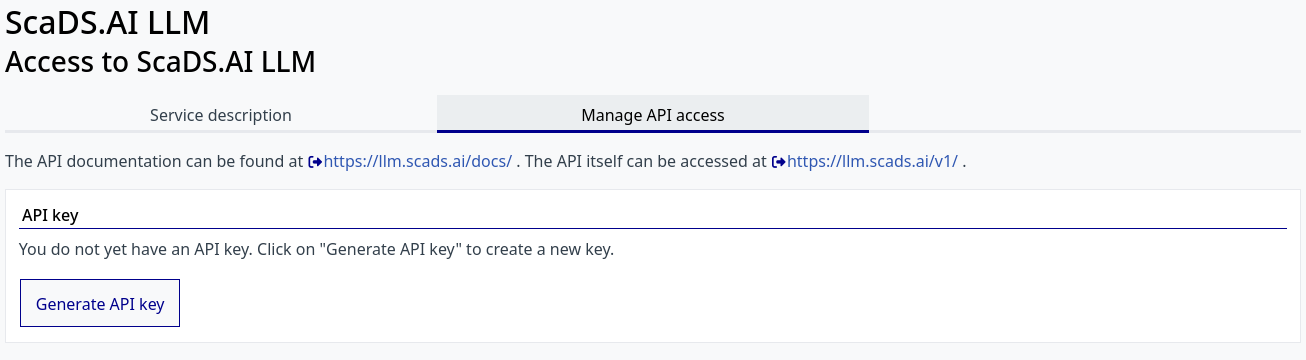
If you lose your key or accidentally share it, you can regenerate it at any time. Note that regenerating will reset your displayed usage data.
Please send an email to llm.scads.ai@tu-dresden.de with the following information:
Subject
TUD:AI API Key
Body
Hi team,

Could you please give me an API key to access the services?

I work on [put_your_topic_or_interest] in [put_name_of_your_group_leader]'s group.

Best regards,
If you already have a key and want another key, e.g. for a different project, please mention that in your request.
Rate Limits
Keys created through the Self-Service Portal come with a restrictive request-per-minute limit by default. If you consistently send a high volume of requests to a model — to the point where it significantly impacts availability for other users — we may impose additional limits on your key. If you require a higher rate limit, please contact us.
Fallbacks
Behind most aliases or models, there is a default model and a chain of fallback models that are tried if the default model cannot respond. The exact model that provided the output is mentioned in the response. The following table lists all models with fallbacks (models not mentioned do not have a fallback):
| Model name | Fallback model chain |
|---|---|
| alias-code | openai/gpt-oss-120b, google/gemma-4-26B-A4B-it |
| alias-ha | google/gemma-4-26B-A4B-it, openai/gpt-oss-120b, MiniMaxAI/MiniMax-M3 |
| alias-image-generation | black-forest-labs/FLUX.2-dev |
| alias-reasoning | openai/gpt-oss-120b, MiniMaxAI/MiniMax-M3 |
| alias-vision | Qwen/Qwen3.8-27B, MiniMaxAI/MiniMax-M3 |
| black-forest-labs/FLUX.2-dev | alias-image-generation |
| black-forest-labs/FLUX.2-klein-4B | black-forest-labs/FLUX.2-dev |
| deepseek-ai/DeepSeek-V4.1-Flash | MiniMaxAI/MiniMax-M3, zai-org/GLM-5.3-Flash |
| google/gemma-4-26B-A4B-it | openai/gpt-oss-120b, meta-llama/Llama-3.3-70B-Instruct |
| meta-llama/Llama-3.3-70B-Instruct | google/gemma-4-26B-A4B-it, openai/gpt-oss-120b |
| MiniMaxAI/MiniMax-M3 | zai-org/GLM-5.3-Flash, zai-org/GLM-5.3 |
| openai/gpt-oss-120b | google/gemma-4-26B-A4B-it |
| Qwen/Qwen3.8-27B | openai/gpt-oss-120b, google/gemma-4-26B-A4B-it |
| zai-org/GLM-5.3-Flash | deepseek-ai/DeepSeek-V4.1-Flash, MiniMaxAI/MiniMax-M3 |
| zai-org/GLM-5.3 | MiniMaxAI/MiniMax-M3 |
Fallbacks are only used when the model itself cannot answer, for example because it is offline, overloaded or fails.
Errors caused by the request are returned to you with the model's own message and are not passed on to a fallback model:
status 400, 413 or 422, for example for an unsupported parameter value, a prompt longer than the context length or an invalid schema.
The same applies if you exceed the rate limit of your key: you get status 429 with a retry-after header.
If you want to avoid using fallbacks, use "disable_fallbacks": true as described in the LiteLLM documentation. If you use the OpenAI Python package, add the parameter extra_body={"disable_fallbacks": true} to the client.chat.completions.create call.
On request, we can disable this fallback mechanism for your key.